Samplers Images
Hi everyone. I think there could be sampler images in the audio tab.
Okay, I'll grab an image from the internet, but...
The problem with using custom items is that we can't overlay the image (place it on top of a stage, for example) because we can't remove the background from the photo.
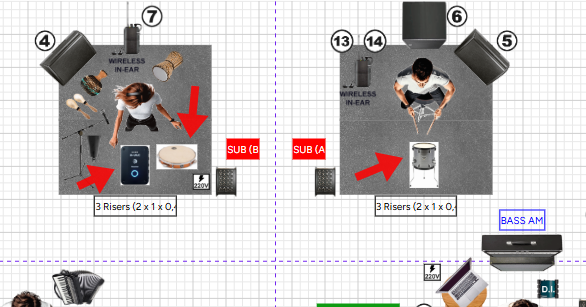
What do you think?
Thank you.
Log in to comment and vote
Comments5
mcidesarrollo
May 6
Hello Titio, thanks for your suggestion!
However, Ridermaker allows you to upload images without a white background. You must upload them in .png format, which allows for transparent backgrounds.
If your images show a background, it's either because they already had that background in the image itself or because you converted them to .jpg, which doesn't allow for transparency.
Titio Produções de Áudio
May 7
Hello Mcidesarrollo.
I'm getting some images from the internet, converting them to transparent PNGs, and adding them to my Custom library.
So far it's working.
But don't forget to add sampler images to the Ridermaker library.
I think it's important to have these images for all users.
Thank you.
mcidesarrollo
May 7
Okay Titio, we'll look into it. Do you have any suggestions for a standard sampler?
Titio Produções de Áudio
May 7
Hello Mcidesarrollo.
When we talk about samplers or MPCs, two names come to mind: Akai and Roland.
I chose the Akai MPC myself, but a friend sent me a picture of the other one. And when I added it to my library, I saw that it was a Roland.
Thank you again.
mcidesarrollo
May 7
Okay Titio, thanks! We'll move it to "Planned"