It's complicated because the PDF design is intended for a maximum of 3 custom columns (which is usually sufficient for most users). Increasing to 4 would break the design in some cases.
In any case, we'll evaluate it and listen to whether users request this functionality.
mcidesarrollo
Team•
Nov 7, 2025
Hi Titio, thanks for your suggestion! You can create up to 3 fully customized columns, and you can name one of them "Subnake" and give it any values you want (like A1, A2, A3, B5, B6, etc.) to use in all your riders.
By default, the program includes the Stand and Mic columns, but you can modify them and create others.
Titio Produções de Áudio
•
Nov 7, 2025
Hello Desarrollo.
I know we can create 3 columns.
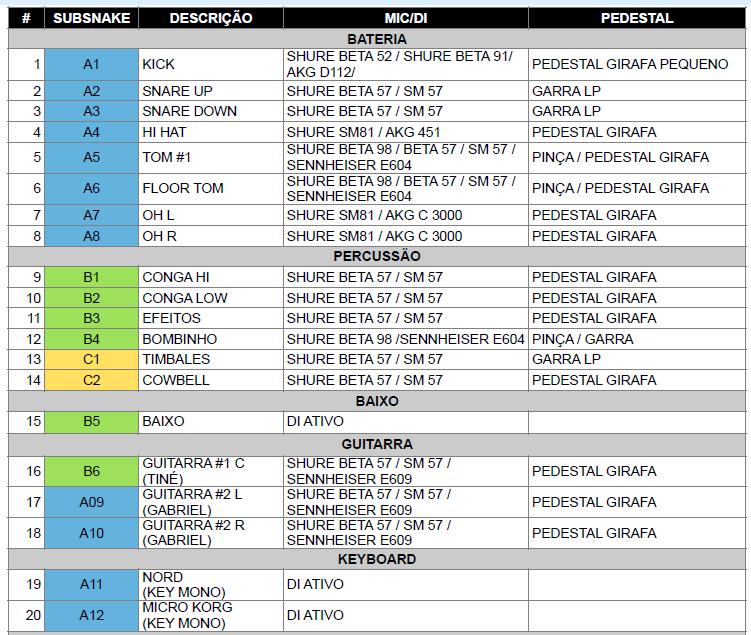
I use all 3 (photo attached) and I didn't want to lose one to inform the subsnake.
I wanted to have one more column next to the channel number, and also be able to choose the colors, as in the example I showed.
I don't use the subsnake yet, but I will start using it, and I think that having another column at the beginning on the left side, next to the channel number, makes it easier for the technician who will be making the connections on stage.
Log in to comment and vote
Comments3
mcidesarrollo
Nov 11, 2025
Hello Titio, thank you very much for the details.
It's complicated because the PDF design is intended for a maximum of 3 custom columns (which is usually sufficient for most users). Increasing to 4 would break the design in some cases.
In any case, we'll evaluate it and listen to whether users request this functionality.
mcidesarrollo
Nov 7, 2025
Hi Titio, thanks for your suggestion! You can create up to 3 fully customized columns, and you can name one of them "Subnake" and give it any values you want (like A1, A2, A3, B5, B6, etc.) to use in all your riders.
Here's a link that explains how custom columns work: https://ridermaker.featurebase.app/en/help/articles/4475852-how-to-use-custom-columns
By default, the program includes the Stand and Mic columns, but you can modify them and create others.
Titio Produções de Áudio
Nov 7, 2025
Hello Desarrollo.
I know we can create 3 columns.
I use all 3 (photo attached) and I didn't want to lose one to inform the subsnake.
I wanted to have one more column next to the channel number, and also be able to choose the colors, as in the example I showed.
I don't use the subsnake yet, but I will start using it, and I think that having another column at the beginning on the left side, next to the channel number, makes it easier for the technician who will be making the connections on stage.
Thank you again for your reply.